Cameo now automatically purges redundant emails, long-expired memberships and old bookings according to the schedule set in admin → system preferences.
Contents
Background
Expired memberships, old emails and bookings should be deleted, to:
- conserve space, and
- meet data retention obligations under GDPR.
Emails take up the majority of the database storage. For many of these, the content differs only marginally from person to person. So the database grows significantly over time if these are not pruned.
Previously you started this deletion manually, in member tasks → purge. The settings at the end of admin → system preferences determine the retention periods.
Automatic purge
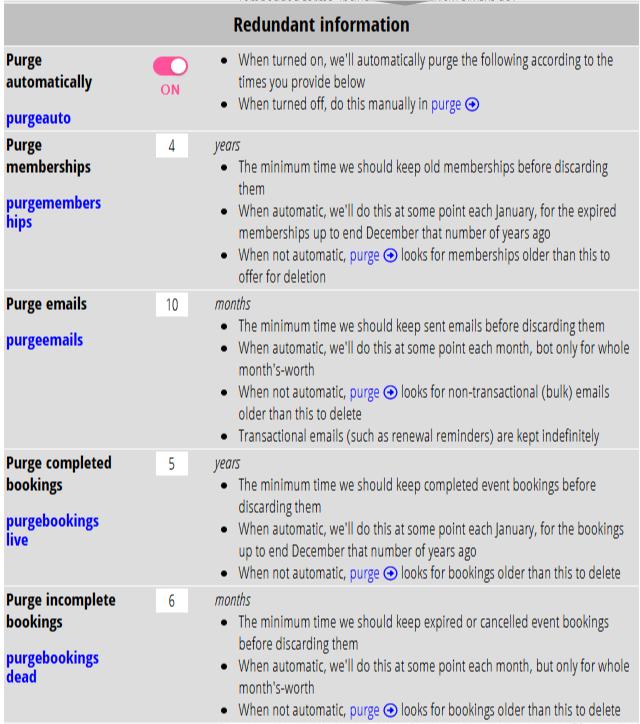
Now, Cameo does this automatically. If you don’t want this to happen, you can turn off the Purge automatically preference in admin → system preferences (Fig 1). This is on by default.
You already say, in admin → system preferences (Fig 1), how long to retain:
- expired memberships (usually several years)
- non-transactional emails (usually a few months; we keep transactional ones, like renewal reminders, indefinitely)
- expired and cancelled bookings (usually a few months)
- completed bookings (a few years)
You may want to review these settings.
Cameo deletes the years-old items sometime in January each year, for the calendar year which meets the criteria you set. For example, on, say, 12 Jan 2027, we might delete former members with a 5 year retention who expired in or before the whole of 2021.
For months-old items, each month we delete before the given number of months ago.