
You can now produce reports in accounting info → direct debit information which helps in keeping GoCardless accounts in sync with Cameo.
That section also now includes a button to keep a copy of the email address on a member’s GoCardless account in their member record independently of their main email address, when they deliberately want to keep these different.
Contents
Background
It remains problematic to keep GoCardless data in sync with Cameo data. The problem particularly becomes evident when GoCardless email customers; we discover their email is out-of-date. Recent introduction of automatic updates to email at GoCardless when Cameo email changes should help.
However, relatively commonly, some people deliberately and legitimately use a different email address for GoCardless from Cameo. That thwarts attempts to update automatically. Sometimes they do this in error.
GoCardless report
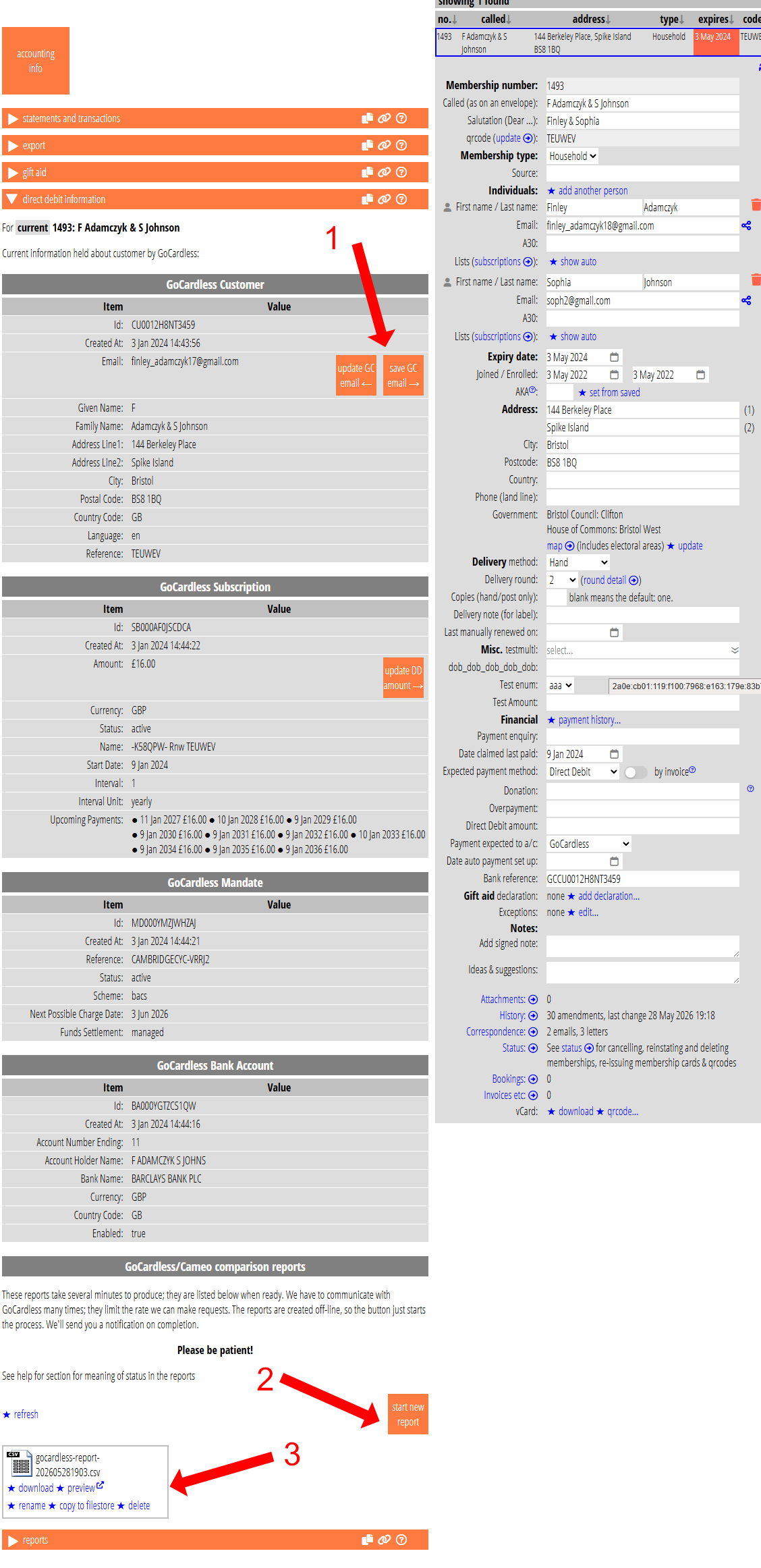
You can find a button start new report to produce a CSV format report at the end of accounting info → direct debit information (Fig 1: 2). Reports are stored as attachments and displayed below the button in the usual way (Fig 1: 3). From there you can preview a report in your browser or download it for analysis in a spreadsheet app.
Reports provide information about everyone recorded as paying with a payment method whose processor is GoCardless (for example Direct Debit). These members should have their GoCardless customer account number in Cameo’s bank reference field. In that field, we precede it with GC, to distinguish it from other references. Except for very old customer accounts, GoCardless also uses a prefix CU, so it looks something like GCCU0012H8NT3459 in Cameo’s bank reference. Recent account numbers have doubled in length. If we don’t find such a number, the spreadsheet tells you that (you should locate it at GoCardless and add it).
Reports include a status, as shown in the table below. Sometimes, you may find it helpful to sort the spreadsheet by status.
Reports primarily compare email addresses held at both ends and whether they match. Each row also includes the various related identifiers that GoCardless uses (any additional customer numbers, mandates and subscriptions including amounts). For mandates, we also show whether their bank requires the customer to approve any changed subscription amount. That is a particular case when they send emails, and why it is necessary to keep them accurate.
| status | meaning |
|---|---|
| ok | Email held by GC matches at least one member’s address. |
| no‑match | Though we can locate the GC customer, its email does not match any Cameo address – either it is out of step or they have deliberately used a different email address. |
| no‑custno | We don’t have their customer number recorded in Cameo’s bank reference field, so we can’t look them up in GC. |
| missing | Though we have a GC customer number, that customer does not exist at GC. |
| handle | We don’t have a current email match, but we did find the email GC has in the member’s handles. This could be because a bouncing email address was moved to the ‘Bouncing email’ handle, or you can usefully record deliberately different addresses by keeping the GC one in a handle (such as ‘GoCardless’ – see below) The handle column shows where we found it. |
| history | We don’t have a current email match, but we did find the email GC has in the member’s change history. This is almost certainly an out of date email at GC. The history date column contans the date of the change so you can locate it for more detail. |
Synchronising email addresses
We now offer two buttons in accounting info → direct debit information when the email address on the GoCardless account does not match any in Cameo’s member record (Fig 1: 1):
- update GC email: (this button is not new, but has moved to adjacent to the email address) this changes the email on the GoCardless account so that it matches that held by Cameo. If there is more than one individual with an email address, we ask you which to apply. When you change a member email address in Cameo that previously matched GoCardless, then we also update GoCardless automatically now. This button deals with older out-of-date records and cases where the email should be changed despite there not being a match in the first place.
- save GC email: this is the opposite, we save the email address from the GoCardless account into an additional handle for the member in Cameo. Again, if there is more that one candidate, we ask which. The handle’s service is named GoCardless. By recording the GC address, we can:
- change their status in the report to show this, which tells you you have already thought about it, and
- not show theses buttons when that handle also matches
When someone changes their email address, and their GoCardless address was different, it can be hard do decide whether to change that as well. For example, a common pattern is to use something like myname+orgname@gmail.com for the address you know them by and myname+gocardless@gmail.com for the GoCardless account. These end up in the same inbox. However, if one of them is compromised, the owner can direct any emails received to spam. It can also help in automatically sorting email. If they abandon myname@gmail.com, then both addresses probably need to change, but you would need to ask.
Similarly, they use a personal email address in Cameo and a work email address in GoCardless. Then what? They are unlikely to tell you they changed jobs. This may reflect an older change to Cameo in which case you can bring them back into alignment. Otherwise, you would need to check.