
You can now have a new kind of renewal reminder in renewals → renewal reminders, for memberships with automated payment methods (such as Direct Debit) in advance of the main reminder.
Typically you would issue it in the month before sending the existing automated renewal reminder, but it could be further ahead of their expiry if you want.
This extra reminder helps satisfy requirements of the UK’s Digital Markets, Competition and Consumers Act 2024 (DMCCA) in respect of subscription contracts.
Contents
Background
renewals → renewal reminders provides for a cycle of reminders about membership renewal. Previously, you might send messages for next month’s expiring members (both automatic and manual), and also up to three further reminders for people already past their expiry date (including potentially already expired members). The advance automated renewal reminder gives you a further one.
Automated renewal reminders address members who renew their membership by an automated payment method. This means any method (in organisation settings → payment methods) which has automated recurrent selected. This can be:
- Direct Debit (via GoCardless),
- Standing Order (an instruction to pay regularly by bank transfer), or
- Other, for example a continuing credit card mandate (payment processor StripeRecurring, via your Stripe account).
Digital Markets, Competition and Consumers Act
From spring 2027, the DMCCA will require you to:
(a) send two renewal notices in advance to let them know that an annual renewal is coming up (e.g. in September and then again in October for November renewal dates). The new reminder type provides the first of these. If you offer to spread payments (say monthly), the annual subscription rules apply. But if your subscriptions are renewable month to month, you must send out a reminder at least twice a year.
(b) offer to cancel their subscriptions “as easily as they can join”. In practice this means your automated renewal reminders must include a prominent link or button offering cancellation. Typically you would provide this as a personalised link to Cameo’s cancellation form. For example, use the substitution {show: link to cancellation} Members paying by Standing Order are still responsible for cancelling their own mandates (banks don’t let you do this for them), though you should point this out to them.
(c) offer a 14 day cooling-off period after joining and renewal during which they can cancel their automated renewal and receive a (possibly proportionate) refund. You should put this in the confirmation message in the join and renewal forms.
If you are a charity and your membership primarily provides free entry into otherwise paid-for events, then you should be exempt from these regulations. Please take appropriate legal advice if you are considering this route.
Advance automated renewal reminders
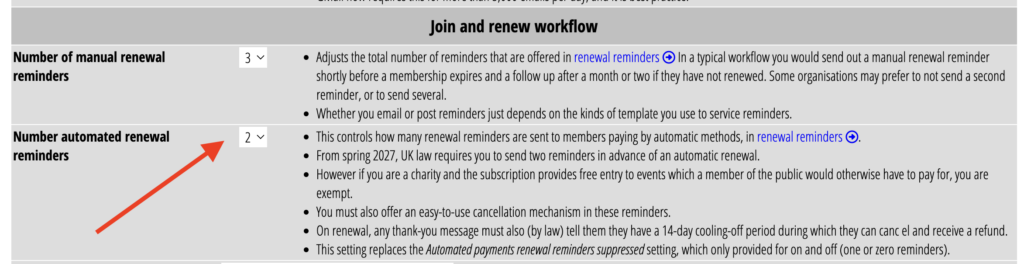
admin → system preferences replaces the previous option to disable automated renewal reminders with the number of automated renewal reminders required (Fig 1). This is similar to setting the number of manual renewal reminders. Choose zero to have the same effect as disabling automated renewal reminders. Choose two to add the new advance automated reminders.
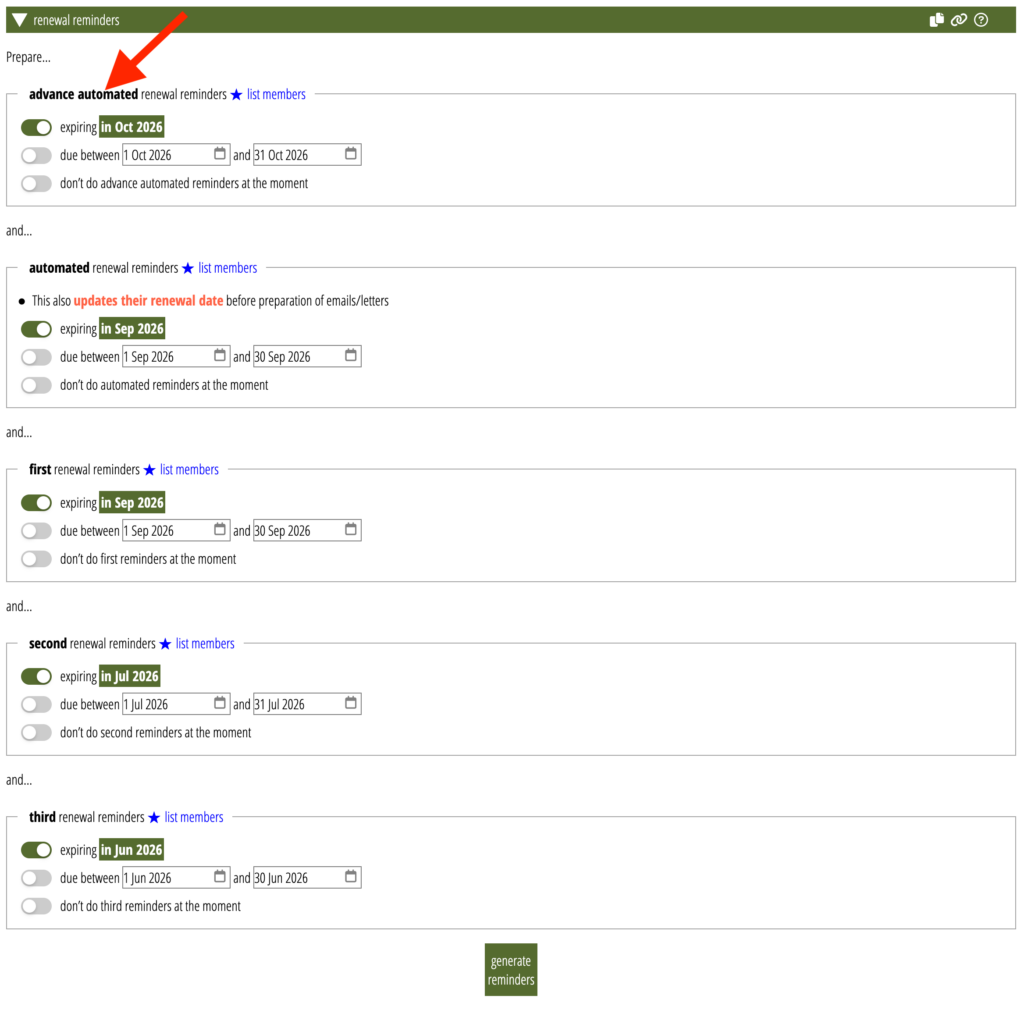
Advance automated reminders appear first in renewals → renewal reminders, as they are the earliest reminder (Fig 2). The ordinary automated renewal reminders and the first renewal reminder for manual payment methods typically address members expiring in the following month. Advance automated reminders address people expiring in at least the month after that.
Once set up, the procedure is exactly the same as before, a single click to prepare all your reminders. The new reminder has its own template, shown at the end of the section, which you’ll need to add and customise.
Implications for Gift Aid
The mandatory fourteen day cooling-off period also has implications for Gift Aid. A refundable payment would not normally be eligible for Gift Aid, but the new legislation should exempt this case. However, if you make a claim on the amount which is later refunded, you must adjust your next claim accordingly. Alternatively, you can ask the payee if they would waive the Gift Aid refund: if they say yes, the tax implications continue to rest with them, and you must keep supporting documentation.