
You can now simulate making a booking for an event, in events & bookings → box office. With a test booking you can:
- preview and proof-read event-related templates without making a real booking
- check the booking’s barcodes, especially in the check.in app
You can do this for event occurrences with any status (including draft).
Contents
Background
There has always been a chicken-and-egg problem with event templates (such as tickets). You couldn’t check the template does what you want without a booking to insert into it. And you couldn’t make a booking without a bookable event. But you don’t want to make an event bookable until you have tested.
Making a test booking
Make a test booking much like a real one.
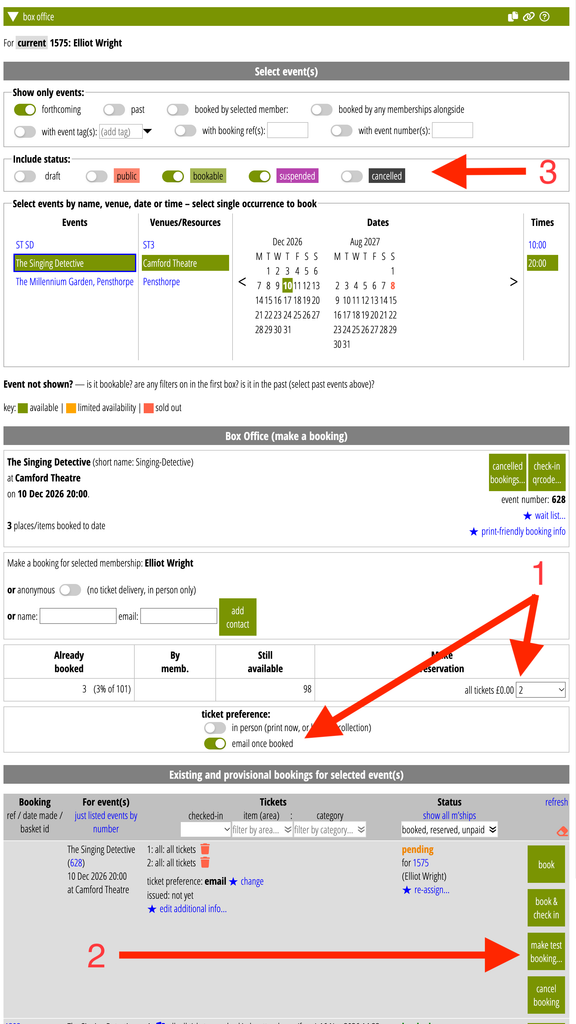
- In events & bookings → box office, select a single event (a single occurrence if you have more than one).
- Select the type and quantity of tickets (or seat if allocated seating), and ticket delivery method where relevant (Fig 1: 2).
- But then in the pending booking, click the new make test booking… button (Fig 1: 2) instead of book, reserve or whatever.
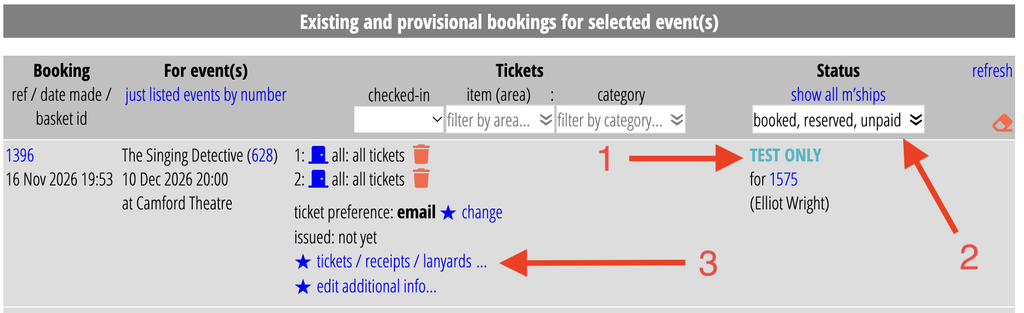
Completed test booking
The bookings list indicates the completed booking is a test (Fig 2: 1). You’ll see it immediately after making the booking. However, to see test bookings in general, and locate this in the future, you need to select test from the status filter menu in the heading of the table of bookings (Fig 2: 2) – by default you only see booked, reserved and unpaid.
The test booking has a unique reference number, as usual. With the test booking you can then do many of the same things you can do with a real booking. The tickets / receipts / lanyards button (Fig 2: 3) offers the same tests, such as:
- display barcodes (with which you can do a test check-in using the check.in app), and
- preview test tickets (to merge with the tickets template). You can also test a booking template with a test booking in communications → templates and mailshots.
However, there are some limitations. Test bookings:
- can’t have real tickets issued for them
- can’t be made for season tickets
- cannot be cancelled
Also, because they aren’t real bookings, they:
- don’t stop someone else from booking the same place, as a real booking would
- don’t contribute to tickets sold, totals, sold-out or reports on sales
- are deleted along with any expired bookings.
Event status filter
You can now choose events (occurrences) to display and select from according to status (Fig 1: 3). Previously we only offered bookable or suspended events. This means you can “book” test tickets for draft or public events. This removes the chicken-and-egg problem where an event needs to be bookable to make a booking but you don’t want to do that until you have checked or customised the template.
As with suspended events, which you always could see in box office, you can now also make real bookings manually for draft, public and even cancelled events in the box office, which aren’t available for self-service booking. For example, this allows you to reserve blocks of seating before opening booking generally. (You can set a category of tickets as private in the price plan, specifically for this purpose). You might use this where:
- a sponsor automatically gets their own places for events,
- a third-party manages booking for some blocks, so you don;t want to offer these directly,
- you want to reserve certain seating not used unless the event otherwise sells out (when you can cancel the reservation, allowing them to go on sale)
Caveat
Apart from not influencing the rest of the bookings, a test booking is the same as a real one. That means you can’t test tickets if the booking would not naturally produce tickets.
- If the event is set to not have tickets, a test booking will not let you test tickets
- If you choose a ticket option for paper tickets, you won’t be able to test email ticket templates
- Conversely, selecting emailed tickets makes it harder to test paper tickets.
- If you make an anonymous test booking, you won’t have an email address available, and so also can’t test emailed tickets with it
- If you make a test booking from a private ticket category, that by definition does not offer tickets, so you won’t be able to test them.
So, when making test bookings, generally you would “book” them for a membership that has an email address. You could make a contact for the purpose. But the selected person won’t get real email about the event anyway, including tickets.