.
A switch in admin → system preferences now controls whether you download test versions of WordPress plugins or not from forms → wordpress plugins.
Contents
Background
Cameo offers a handful of plugins to install in WordPress websites. These connect your WordPress site automatically to the copy of Cameo from which they were obtained.
When working with a test version of Cameo, you would often install its plugins in a test version of your WordPress website. (Some people call that a staging site). That way both test website and test Cameo work together, completely independently of your live website and live Cameo.
However, if you only have access to a single, live version of your website, it is still possible to try out pages with forms etc. from test versions of Cameo. Because Cameo names test plugins and their blocks, short codes etc. slightly differently from the live plugins, they can co-exist, even though they talk to different versions of Cameo.
You should be aware of a down-side of doing this if you later make a copy of the live WordPress site for testing. Then, existing pages won’t reference the differently named plugins from your test copy of Cameo. However, if you keep both separate, you just need to replace the plugins, where previously you would have to find all uses of them and change those.
Therefore, Cameo now makes this choice explicit, whether or not you download from a test version of Cameo.
System preference
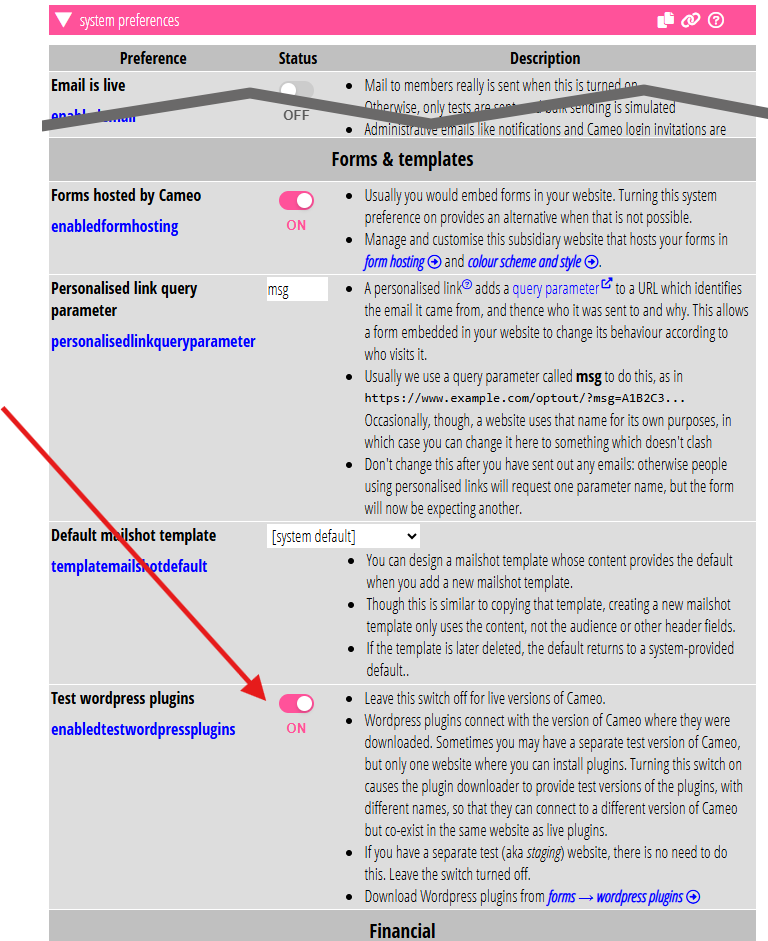
If you need both sets of plugins, live and test, to co-exist in the same WordPress site, then you turn on test plugins in admin → system preferences.
If you have test Cameo paired with a test WordPress site then you don’t need to turn this on. Reinstalling the plugins in your test WordPress replaces the live versions from making the copy of WordPress. So pages continue to work as before, while connecting now to test Cameo to supply forms etc.
This choice is Test WordPress plugins under forms and templates in admin → system preferences (Fig 1). If you have a separate test WordPress site, leave it off. If you only have one website, turn it on in your test version of Cameo.